





Testi nel Footer
Nel caso il tuo sito preveda un testo (chi siamo o simili) nel footer, per modificarlo, accedere al pannello di amministrazione e dal menu del pannello a sinistra, cliccare su Moduli > Moduli installati.
Nella barra di ricerca dei moduli, cercare IQITHTMLANDBANNERS e cliccare sul pulsante Configura.
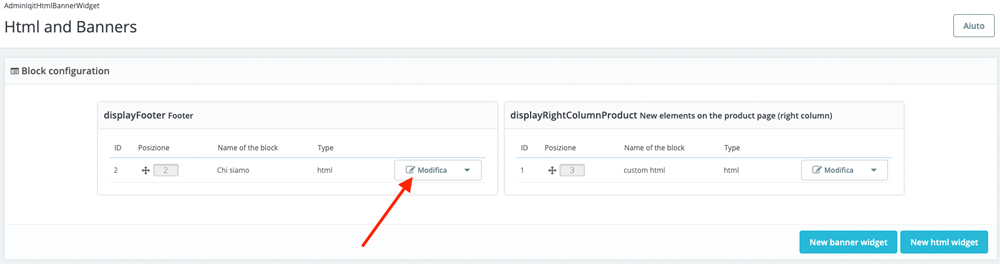
Ora cliccare sul pulsante Modifica indicato dalla freccia rossa.
Alla voce Name of the block modificare il titolo, che sarà visibile anche lato front office.
Alla voce Content modificare il testo ed eventuale immagine. Come consigliamo sempre, evitare di copiare il testo da altre fonti per evitare di importare stili e codici non necessari o che potrebbero disturbare le impostazioni di visualizzazione dell'elemento.
Infine cliccare sul pulsante Salva.