




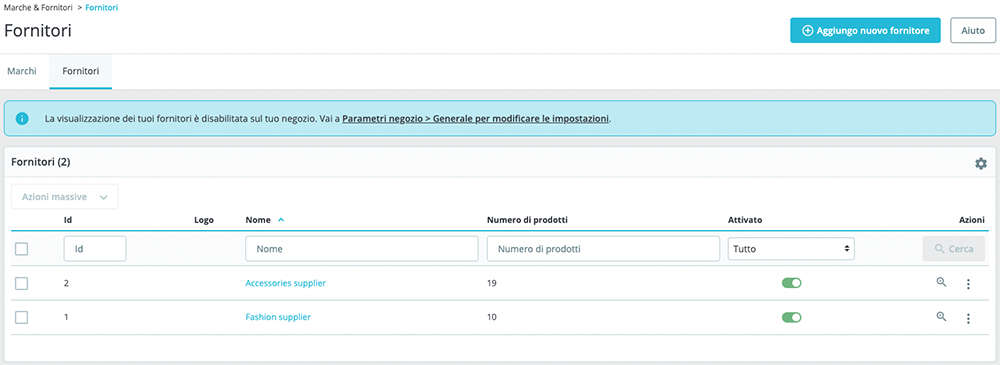
Cliccare su Catalogo > Marchi e Fornitori per accedere alla sezione dove è possibile gestire marchi/produttori e fornitori riguardanti i prodotti.
Nel primo tab sono presenti tutti i marchi ed eventuali loro indirizzi.
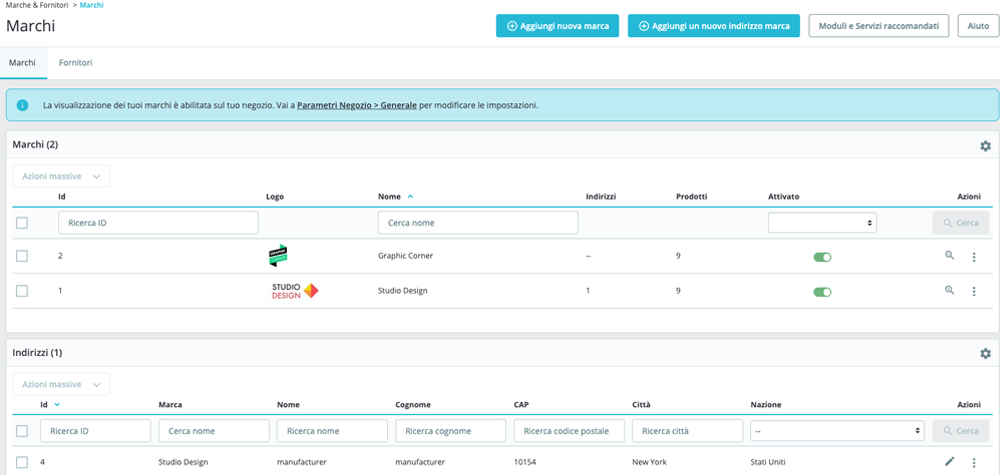
Per creare un marchio/produttore cliccare su + Aggiungi nuova marca e inserire tutte le informazioni richieste. Cliccare su Salva per completare l’operazione. Per inserire un eventuale suo indirizzo, cliccare su + Aggiungi un nuovo indirizzo marca, selezionare dal menu a tendina la marca, inserire l'indirizzo e cliccare su Salva.
For editing menu navigation settings go to Theme Options > Header > Top of Header > Menu Element
For editing menus items go to Appearance > Menus
And for styling menus go to Theme Options > Header > Top of Header > Menu Styles of this Row
For editing menu navigation settings go to Theme Options > Header > Top of Header > Menu Element
For editing menus items go to Appearance > Menus
And for styling menus go to Theme Options > Header > Top of Header > Menu Styles of this Row
For editing menu navigation settings go to Theme Options > Header > Top of Header > Menu Element
For editing menus items go to Appearance > Menus
And for styling menus go to Theme Options > Header > Top of Header > Menu Styles of this Row
For editing menu navigation settings go to Theme Options > Header > Top of Header > Menu Element
For editing menus items go to Appearance > Menus
And for styling menus go to Theme Options > Header > Top of Header > Menu Styles of this Row